
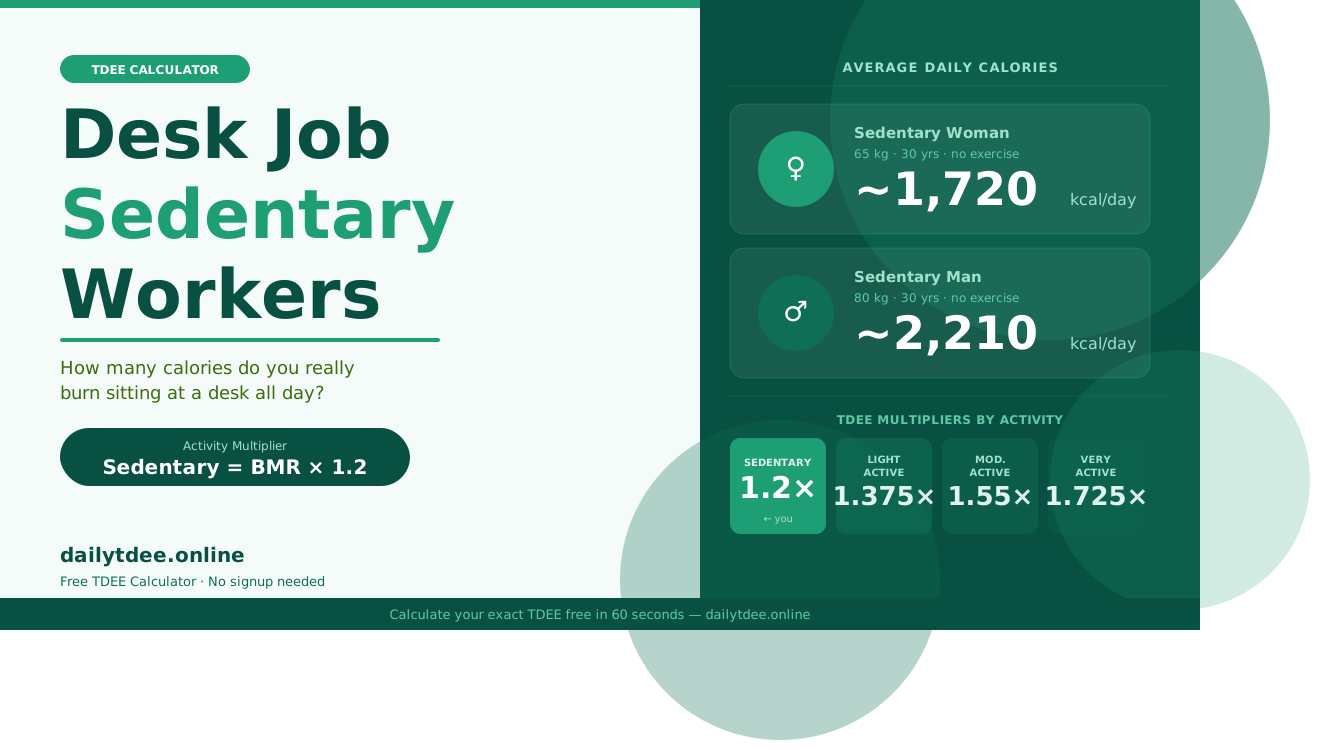
Why Desk Job Workers Need a Smarter TDEE Calculation
If you spend 8+ hours sitting at a screen, you already know how easy it is to gain weight — even when you think you’re eating “normally.” The reason? Most people with a desk job dramatically overestimate how many calories they burn each day.
That’s why using a TDEE calculator desk job sedentary setting is one of the most important steps you can take for your health and weight management. Your Total Daily Energy Expenditure (TDEE) tells you exactly how many calories your body burns in a 24-hour period — and for desk workers, that number is often much lower than expected.
In this guide, you’ll learn how to accurately calculate your TDEE as a sedentary desk job worker, what activity level to select, and how to use that number to lose weight, maintain, or even build muscle — all while living a mostly inactive lifestyle.
Table of Contents
What Is TDEE and Why Does It Matter for Desk Job Workers?
TDEE (Total Daily Energy Expenditure) is the total number of calories your body needs to function throughout the entire day — including sleeping, breathing, digesting food, and any physical movement.
For desk job workers, TDEE is especially important because:
- You burn far fewer calories than someone with a physically active job
- Metabolic rate can slow down due to prolonged sitting
- Hunger hormones can be dysregulated by screen time and stress
- Overeating is easy when calorie needs are low but food access is high
Using a TDEE calculator desk job sedentary mode gives you a realistic baseline — so you’re not eating for a construction worker’s metabolism when you’re sitting in an office chair.
What Does “Sedentary” Mean in a TDEE Calculator?
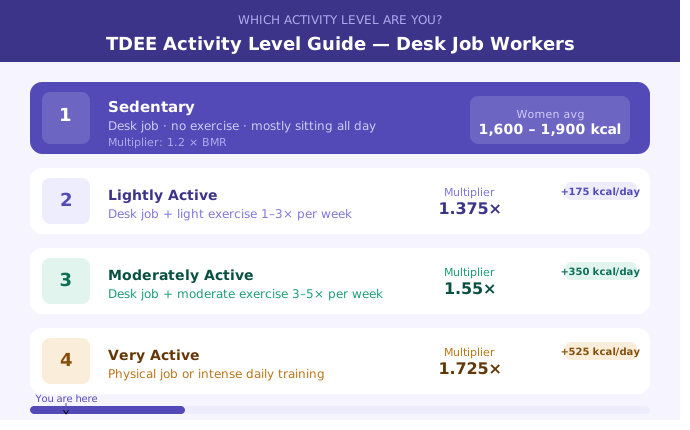
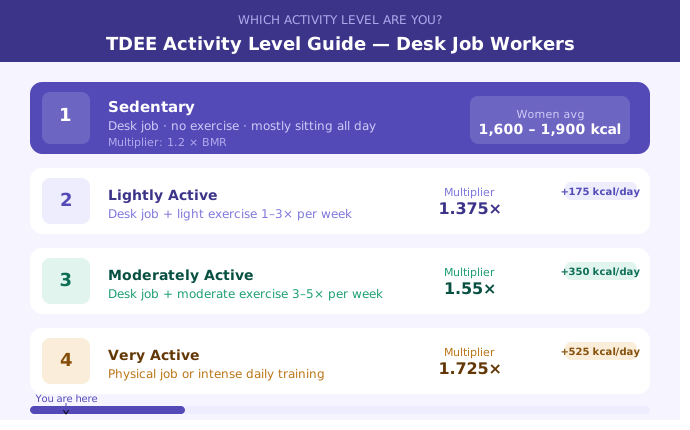
When you open a TDEE calculator desk job sedentary option, you’ll typically see an activity multiplier called “Sedentary (little or no exercise)” — this corresponds to a multiplier of 1.2 applied to your Basal Metabolic Rate (BMR).
Activity Level Guide for Desk Job Workers:
| Activity Level | Description | Multiplier |
|---|---|---|
| Sedentary | Desk job, no exercise | 1.2 |
| Lightly Active | Desk job + light exercise 1–3x/week | 1.375 |
| Moderately Active | Desk job + moderate exercise 3–5x/week | 1.55 |
| Very Active | Physical job or intense daily training | 1.725 |
Most people with a pure desk job and no structured exercise fall squarely into the sedentary category. Selecting the wrong activity level is the #1 mistake people make when using a TDEE calculator desk job sedentary setup — and it leads to eating 200–400 calories more than they should.
How to Use a TDEE Calculator for a Sedentary Desk Job (Step-by-Step)
Follow these steps to get the most accurate result from your TDEE calculator desk job sedentary calculation:
Step 1: Enter Your Basic Stats:
Input your:
- Age
- Gender
- Height
- Current Weight
These values determine your Basal Metabolic Rate (BMR) — the calories you burn just to stay alive at rest.
Step 2: Select “Sedentary” as Your Activity Level:
Since you have a desk job with little to no exercise, always choose Sedentary (1.2x multiplier) in the TDEE calculator desk job sedentary section. Don’t round up — be honest. It’s better to underestimate and adjust upward.
Step 3: Get Your TDEE Number:
The calculator will multiply your BMR by 1.2 to give you your maintenance calories — the number of calories that keeps your current weight stable.
Step 4: Set Your Goal:
- Weight Loss: Eat 300–500 calories below your TDEE
- Maintenance: Eat at your TDEE
- Muscle Gain: Eat 200–300 calories above your TDEE
Step 5: Track and Adjust:
After 2–3 weeks, if your weight isn’t responding as expected, adjust your calories by 100–150 per day. Your TDEE calculator desk job sedentary result is an estimate — real-world feedback fine-tunes it.
👉 Use the Free TDEE Calculator at DailyTDEE.online to get your number in under 60 seconds.
TDEE Ranges for Sedentary Desk Job Workers (By Gender & Weight):
Here are realistic TDEE estimates for sedentary desk job workers using the standard TDEE calculator desk job sedentary formula:
For Women (Desk Job, Sedentary):
| Weight | Age 25 | Age 35 | Age 45 |
|---|---|---|---|
| 55 kg / 121 lbs | ~1,650 kcal | ~1,590 kcal | ~1,530 kcal |
| 65 kg / 143 lbs | ~1,780 kcal | ~1,720 kcal | ~1,650 kcal |
| 75 kg / 165 lbs | ~1,910 kcal | ~1,840 kcal | ~1,770 kcal |
For Men (Desk Job, Sedentary):
| Weight | Age 25 | Age 35 | Age 45 |
|---|---|---|---|
| 70 kg / 154 lbs | ~2,150 kcal | ~2,060 kcal | ~1,970 kcal |
| 80 kg / 176 lbs | ~2,310 kcal | ~2,210 kcal | ~2,110 kcal |
| 90 kg / 198 lbs | ~2,460 kcal | ~2,360 kcal | ~2,250 kcal |
These values are calculated using the TDEE calculator desk job sedentary multiplier of 1.2. They will vary slightly based on body composition and individual metabolism.
Why Desk Job Workers Gain Weight (And How TDEE Fixes It):
Understanding your TDEE calculator desk job sedentary number helps explain the most common reasons desk workers gain weight:
1. Eating for a More Active Lifestyle
Many people eat based on what they used to eat when they were more active — in school, at a physically active job, or before having kids. Without recalculating using a TDEE calculator desk job sedentary mode, they’re eating 300–600 calories too many every day.
2. Stress Eating and Cortisol
Desk jobs often come with high mental stress. Cortisol, the stress hormone, increases appetite and encourages fat storage — particularly around the belly. Knowing your TDEE helps you stay accountable even on stressful days.
3. Snacking Out of Boredom
Sitting in front of a screen increases mindless snacking. When your TDEE calculator desk job sedentary result tells you your maintenance is only 1,900 calories, even one bag of chips can represent 15–20% of your daily budget.
4. Underestimating Liquid Calories
Coffee drinks, juices, and sodas add up fast. Your TDEE calculator desk job sedentary number accounts for food — but tracking beverages is equally important.
How to Increase Your TDEE as a Desk Job Worker:
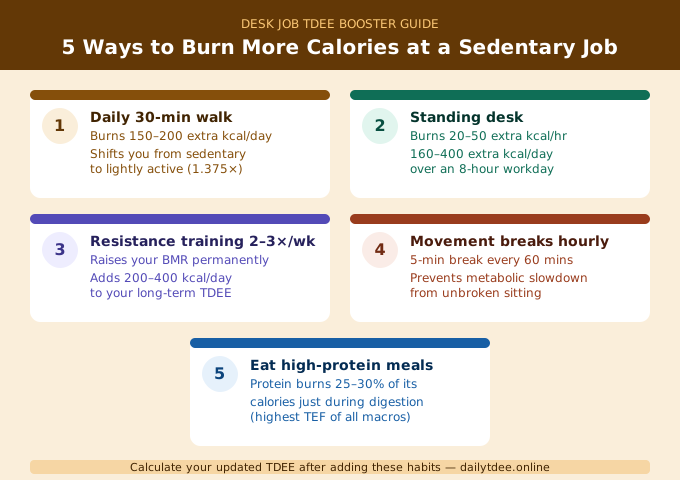
Here’s the good news: even without quitting your job, you can raise your daily calorie burn and shift from the sedentary category:
1. Add a 20–30 Minute Walk Daily:
A daily walk bumps you from sedentary to lightly active, increasing your TDEE by 150–250 calories. Recalculate using TDEE calculator desk job sedentary vs. “lightly active” to see the difference.
2. Use a Standing Desk:
Standing burns 20–50 more calories per hour than sitting. Over an 8-hour workday, that’s 160–400 extra calories.
3. Resistance Training 2–3x Per Week:
Building muscle raises your BMR (resting metabolism). Even with a desk job, adding strength training 2–3 times a week can shift your activity multiplier and increase your TDEE by 200–400 calories.
4. Take Micro-Breaks Every Hour:
Five minutes of movement per hour adds up. It also reduces the metabolic slowdown caused by prolonged sitting.
5. Walk During Calls:
Phone or video calls are an easy opportunity to stand and walk. Small habits compound over time.
TDEE vs. BMR: What’s the Difference for Desk Job Workers?
Many people confuse BMR and TDEE when using a TDEE calculator desk job sedentary tool:
- BMR (Basal Metabolic Rate): Calories burned at complete rest — just keeping your organs running. You should never eat below your BMR long-term.
- TDEE (Total Daily Energy Expenditure): BMR + all activity. This is your real daily calorie target.
For a sedentary desk job worker, TDEE is typically BMR × 1.2. Eating at your TDEE = maintaining weight. Eating below it = losing weight.
👉 Calculate Both Your BMR and TDEE at DailyTDEE.online
Macros for Sedentary Desk Job Workers:
Once you know your TDEE from the TDEE calculator desk job sedentary calculation, the next step is splitting those calories into macronutrients:
For Weight Loss (Sedentary Desk Job):
| Macro | Recommended % | Example (1,800 kcal goal) |
|---|---|---|
| Protein | 30–35% | 135–157g |
| Carbohydrates | 35–40% | 158–180g |
| Fat | 25–30% | 50–60g |
Why High Protein Matters for Desk Workers:
- Preserves muscle mass in a caloric deficit
- Keeps you fuller longer — fighting desk-job snack cravings
- Has the highest thermic effect (burns more calories digesting)
Use your TDEE calculator desk job sedentary result as the base, subtract 300–500 calories, then divide into macros above.
Common Mistakes When Using a TDEE Calculator for a Desk Job
Avoid these errors when using your TDEE calculator desk job sedentary results:
❌ Selecting “Lightly Active” just because you walk to the car — Be honest. If you sit most of the day and don’t exercise, you’re sedentary.
❌ Not updating your TDEE as your weight changes — As you lose weight, your TDEE decreases. Recalculate every 5–10 lbs.
❌ Eating back workout calories — If you’re using a TDEE-based approach, your exercise is already factored in.
❌ Ignoring weekend behavior — Many desk workers are sedentary Monday–Friday but more active on weekends. Use an average.
❌ Eating at BMR instead of TDEE — Your BMR is not your calorie goal. Always use your TDEE calculator desk job sedentary result as the starting point.
Frequently Asked Questions:
Q1: What activity level should I select in a TDEE calculator if I have a desk job?
Q2: How many calories should I eat per day if I have a sedentary desk job?
Q3: Why am I gaining weight even though I eat healthy with a desk job?
Q4: Should I use a TDEE calculator or a BMR calculator for my desk job?
Q5: Can I increase my TDEE without leaving my desk job?
Conclusion:
Take Control of Your Desk Job Metabolism with TDEE:
Working a desk job doesn’t mean you’re stuck with slow metabolism or inevitable weight gain — but it does mean you need to be smarter about your calorie intake than someone with an active job.
Using a TDEE calculator desk job sedentary setting gives you the accurate, personalized data you need to eat with confidence, lose fat without crash dieting, and build healthier habits around your real lifestyle.
The first step is knowing your number. Everything else — your macros, your meal plan, your workout strategy — flows from there.
Ready to find out exactly how many calories you should eat?
👉 Calculate Your TDEE Now — Free at DailyTDEE.online
Get your personalized TDEE calculator desk job sedentary result in under 60 seconds. No sign-up required.